
Bayty
Loading…
Today in London

Your family's day, organised around salah.

One calendar for the whole home, built on the five daily prayers. Plans move with the prayer times all year, so you stop rearranging the week every time Fajr shifts.

Free to startiPhone, Android and computerShare it with your spouse

Asr in 10 minA gentle nudge before the Athaan
Quran moved with Asr20 min after Asr, all year
Five prayers as the backbone of every day Athaan and Iqaamah countdown, always on screen Sayid, an assistant that does the typing Shaped by families who tested it at home
"Can we fit swimming in after Asr, or does that clash now?"
"I set the kids' Quran for 6am. Fajr's at 6:15 this week."
"Who's doing the school run on Thursday?"
Sound familiar?

Ordinary calendars think in clock times. Your day runs on prayer times.

Bayty starts from the other end.The prayers go in first. Everything else is planned around them, tied to them, and moves with them. So the calendar stays right without you touching it.

Plans that move with the prayers

Set it once. It follows Fajr all season.

Keep scrolling to fast-forward through the next six months in London. Watch what happens to a Quran slot on an ordinary calendar, and the same slot in Bayty.

Wednesday 7 October24 Rabi al-Thani 1448
Fajr 5:19 · Iqaamah 5:34
Sunrise 7:12
An ordinary calendarQuran at 5:45 AM, every day
Quran

BaytyQuran, 15 min after the Fajr Iqaamah
Quran

The whole season in London
FajrBayty's Quran slotFixed slotLands before or during salah
0days the fixed slot lands before or during Fajr
0 minfurthest it drifts from its place after Fajr
0changes you make in Bayty

Scroll to move through the season, or drag the slider.

See it for yourself

Real screens from Bayty.

Not drawings. This is the app as a family of four sees it on a phone.

    On a bigger screen

    Plan the day at the kitchen table.

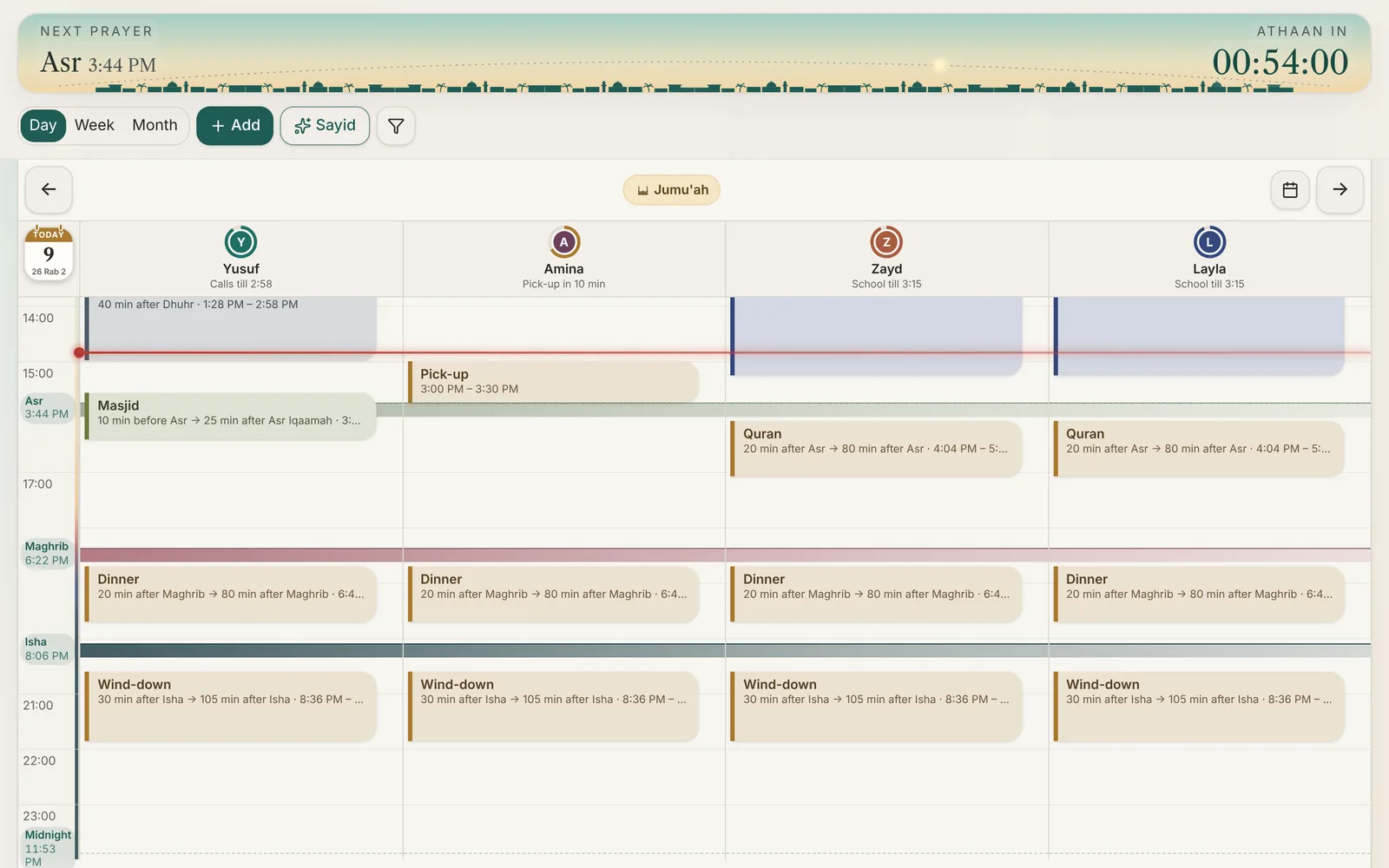
    The whole family's day on a laptop or tablet, with every prayer across everyone. Changes show on every phone in the family.
    bayty.app
    Bayty's Day view on a computer on a Friday: the Jumu'ah pill, each person's status and the Asr band across all four columns
    The whole family, one screen

    Everyone's day, side by side, around the same five prayers.

    • See who's free at a glance. "Free till Asr", "School till 3:15", right under each person.
    • Plan together with your spouse. Changes show on both phones, with a note saying who changed what.
    • The right access for each person. Older children can edit their own plans; younger ones can just look.
    • Tomorrow, in shaa Allah. After Isha, a calm look at the next day, so nobody is caught out.
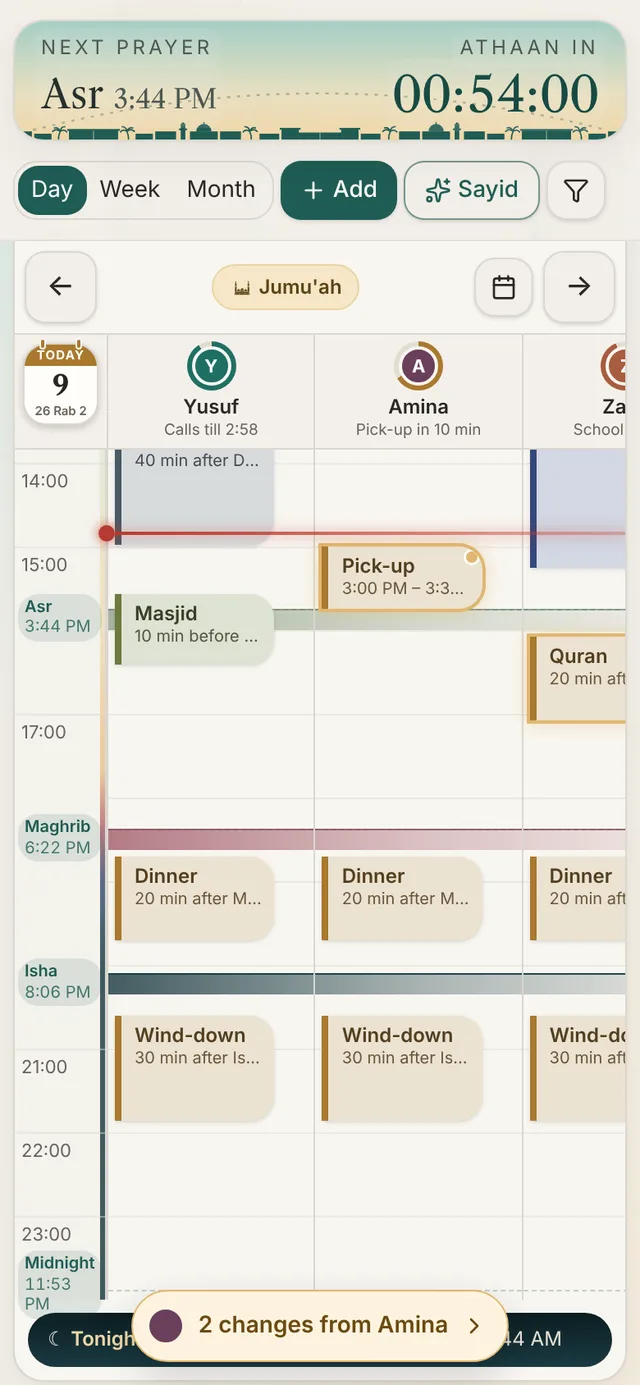
    Bayty's Day view with each person's status under their name and a note saying 2 changes from Amina
    Who's free, at a glanceEach person's status, live
    2 changes from AminaHer edits glow until you've seen them
    Meet Sayid

    Say it the way you'd say it to your family. Sayid does the typing.

    Speak, type, paste last term's timetable, or snap a photo of the school letter. Sayid turns it into plans tied to the prayers, and nothing changes until you tap Apply.

    "When are we all free on Saturday?""Push Zayd's homework back 30 min"Upload a timetable photo or PDF

    2 chats a day free. More for Founding Ambassador families.

    ✦Sayid · your AI assistant
    FootballZayd · Sat · 10:00, duration 60 min
    Quran with LaylaAmina, Layla · Daily · 15 min after Maghrib, duration 30 min
    SwimmingAmina, Layla · Tue · 10 min after Asr Iqaamah, duration 45 min
    Done. Applied 3 changes.
    Built for the Muslim day

    Calm reminders, and a calendar that knows what day it is.

    One colour per moment

    The countdown at the top tells you where you are, without reading a clock.

    Until the Athaan00:42:10
    Until the Iqaamah00:08:31
    Since the Iqaamah00:03:02

    Reminders that respect salah

    A nudge before the Athaan, so you can wrap up. Never a sound at the Iqaamah, so nothing goes off during prayer.

    Maghrib in 10 minBayty · before the Athaan
    Tomorrow, in shaa AllahFajr 5:21 AM · 3 plans for the family

    A look at tomorrow, after Isha

    The next day's prayers and plans in one calm card, so everyone knows where they need to be.
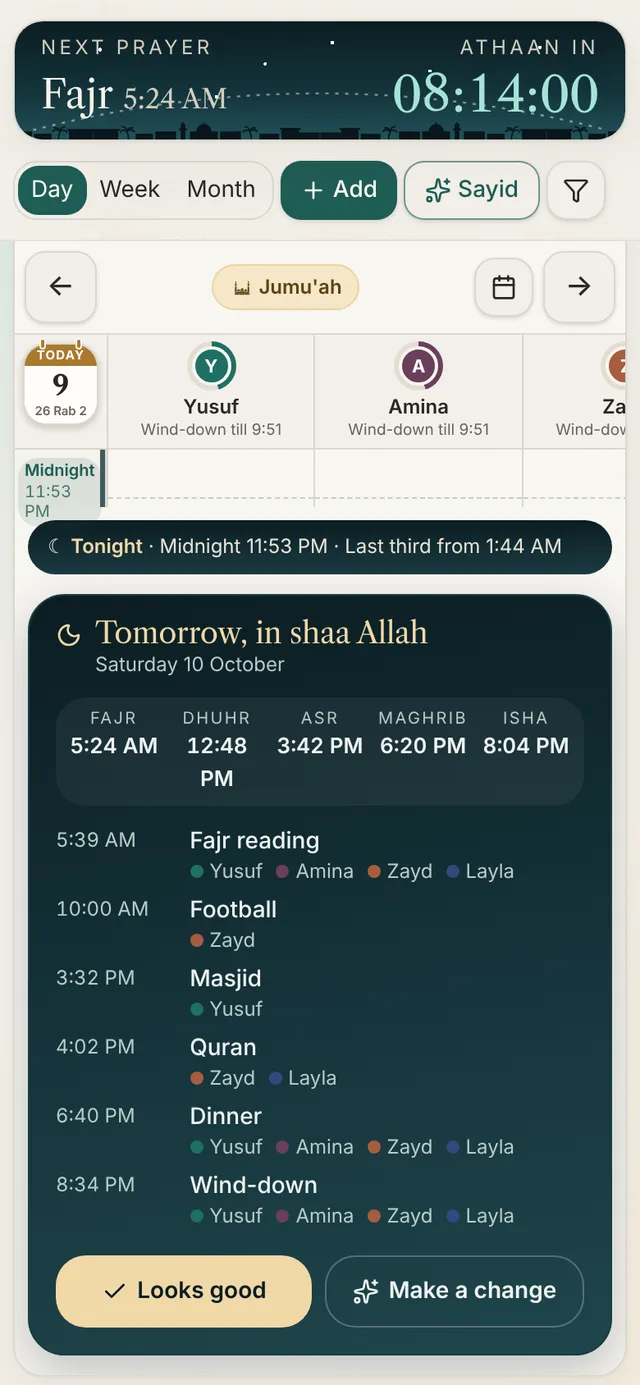
    Bayty's Tomorrow card: the next day's five prayer times and each family member's plans
    Getting started

    Your family's week, set up before the kettle boils.

    Pick your town

    Search over 32,000 towns, or use your phone's location. Prayer times and the Hijri date follow from it.

    About 30 seconds

    Add your family

    Everyone gets a colour. Invite your spouse by email, and they choose to join.

    About a minute

    Tell Sayid your routine

    Paste it, say it or snap it. Review, tap Apply, and the week fills itself in.

    As long as a sentence
    Start free No card needed. Add it to your home screen and it works like an app on iPhone, Android and computer.
    What's coming

    Bayty grows with the families who use it.

    These are built and being checked now. Founding families try them first.

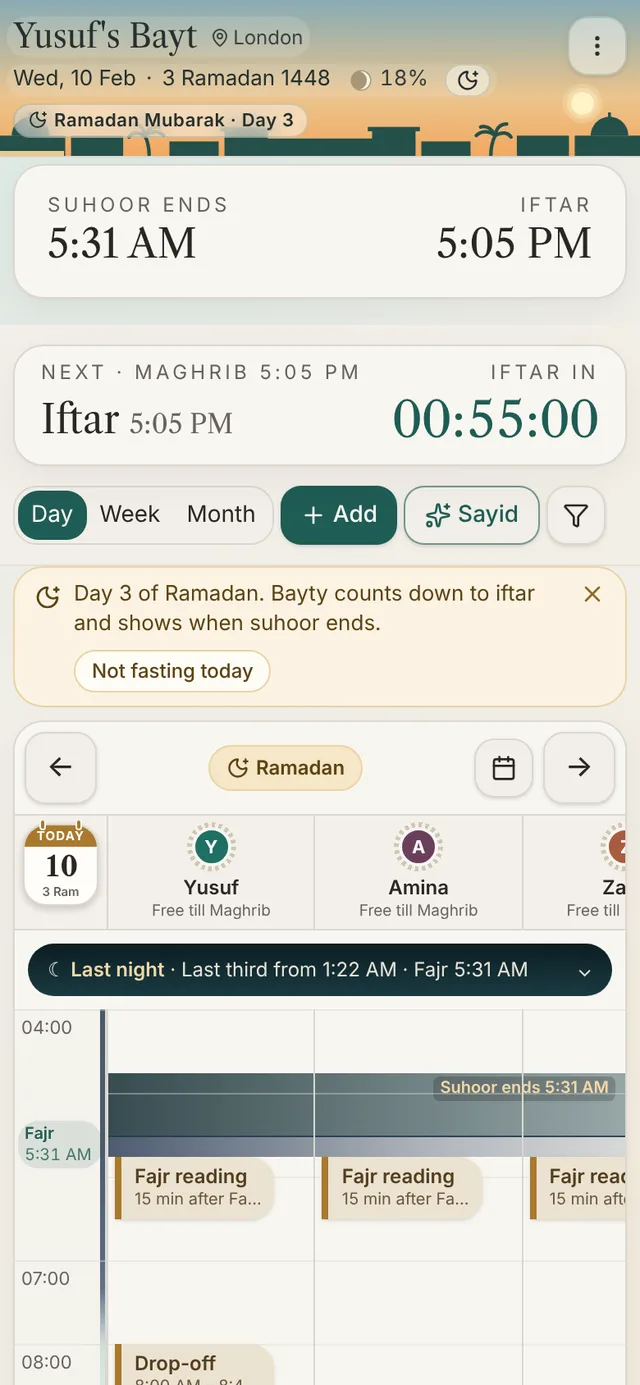
    Bayty in Ramadan: suhoor ends and iftar times, a countdown to iftar and a Ramadan Mubarak greeting
    In testing · before Ramadan

    Ramadan mode

    The countdown leads with iftar, the calendar shows when suhoor ends, and the odd nights of the last ten are marked.
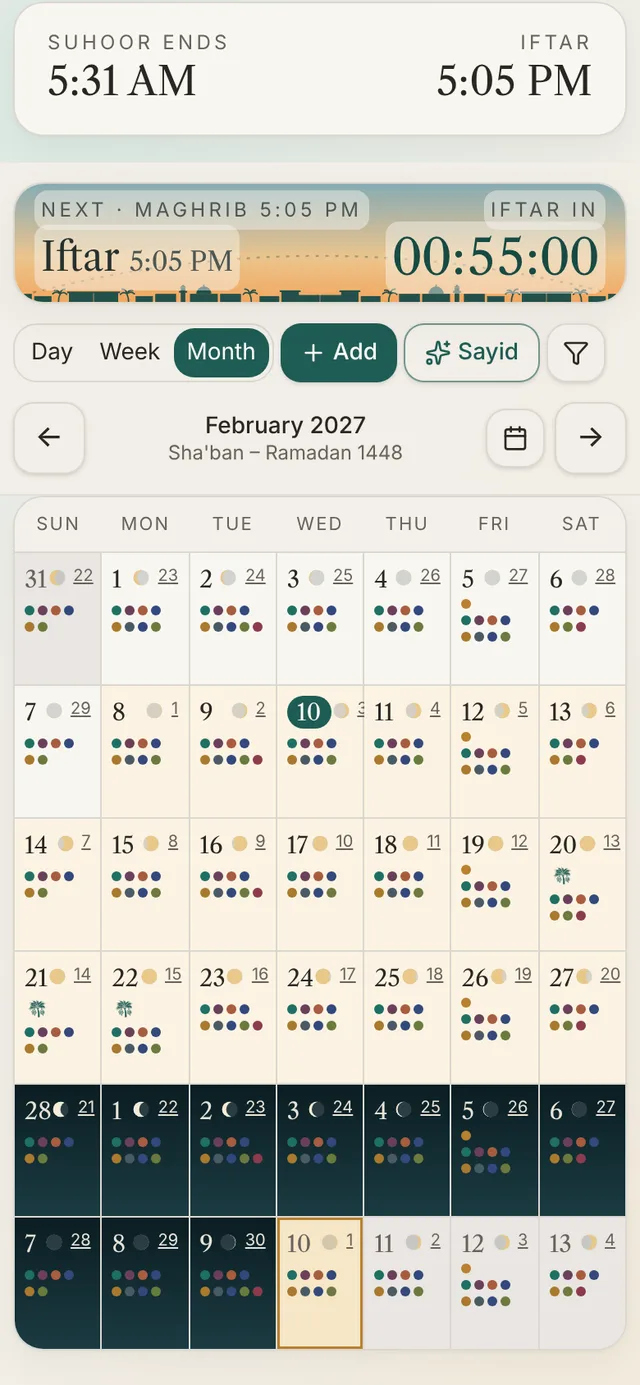
    Bayty's Month view as a moon calendar, with each night's moon and Ramadan picked out
    In testing

    The month by the moon

    Each night's moon on the Month view, with Ramadan and Eid picked out, so the Hijri month is easy to follow.
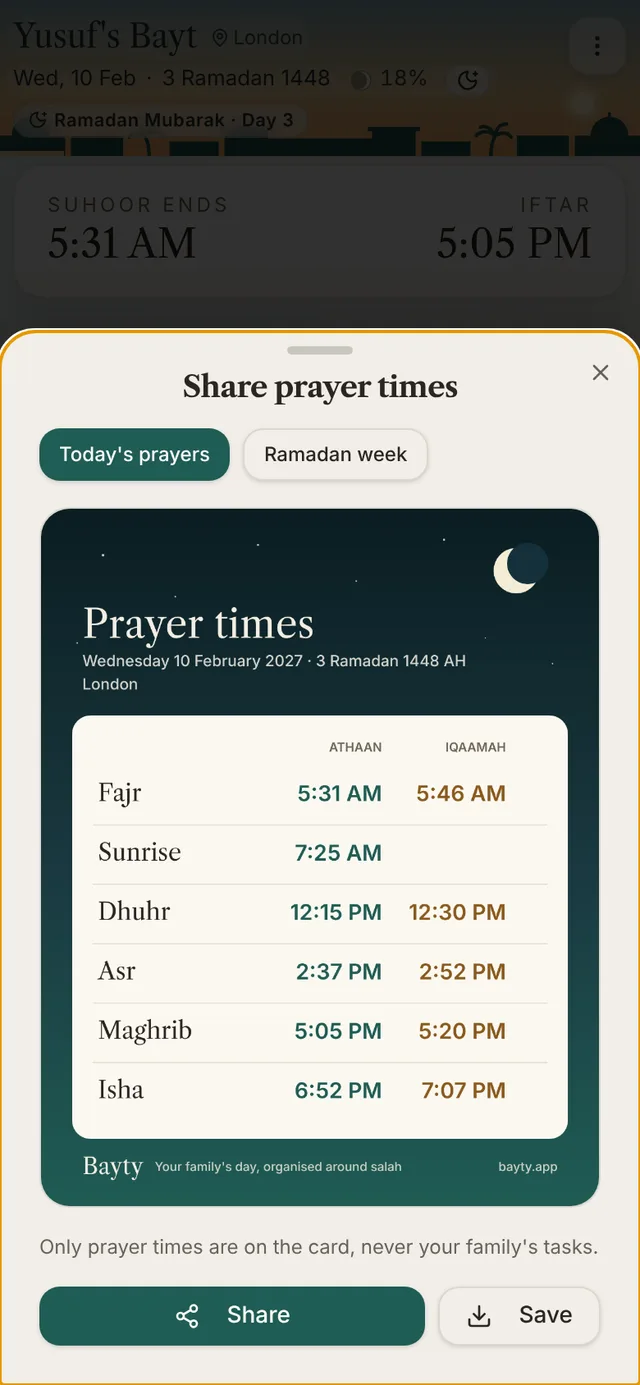
    A shareable card of the day's Athaan and Iqaamah times
    In testing

    Share the day's prayer times

    A clean card of today's Athaan and Iqaamah times to send to family on WhatsApp. It never includes your family's plans.

    PlannedRunning behind? Re-plan in one tap

    Bayty reshuffles what's flexible around the prayers and the things that can't move.

    PlannedReal Athaan recordings

    Choose a real Athaan for your reminders, not just a single default sound.

    PlannedGoogle Calendar, both ways

    Work and school events flow into Bayty, and your Bayty plans show up in Google.

    PlannedBayty on Google Play

    Install Bayty from the Play Store like any other app.

    Ramadan 1448 is on its way

    Expected to begin around Monday 8 February 2027, depending on the moon sighting your community follows. On the first day, iftar in London is at 5:01 PM.

    124days to go
    We're just getting started

    Become a Founding Ambassador family.

    We're inviting 12 families to shape Bayty with us. Use it at home for a few weeks and tell us honestly what works and what doesn't.

    • Every Pro feature, free
    • More chats with Sayid every day
    • New features before anyone else
    • A direct line to the people building it

    12 places · all 12 still open

    Apply for a place

    Takes about a minute. We read every application.

    Please add your first name.
    Please add an email we can reply to, like name@example.com.
    Please add your town, so we know your prayer times.
    Who's at home? Tick all that apply
    Please tick at least one, so we get a mix of families.
    Which phone does your family use?
    Please pick one, so we test on the phones you use.
    We only use your details to reply about the programme. Privacy

    JazakAllahu khairan.

    Your application is in. We read every one and will reply by email, in shaa Allah.

    Questions

    Good to know

    Want the full walk-through? The guide shows every screen, step by step.

    Read the guide · soon
    Is Bayty free?

    Yes. The calendar, prayer times, the countdown and reminders are free, with 2 chats a day with Sayid. A Pro plan with more chats and extra features is on the way.

    Do I need to download anything?

    No app store needed. Open bayty.app on your phone and add it to your home screen. It then opens like any other app and sends reminders. On iPhone, Bayty shows you exactly where to tap.

    Can my spouse and children use it too?

    Yes. Invite them by email. Each person gets the access that suits them: full control, editing their own plans, or view only. Nobody is added until they say yes.

    Does it work where I live?

    Bayty works out prayer times for over 32,000 towns and cities, follows your local clock changes, and lets you set your masjid's Iqaamah times and Jumu'ah. You can nudge the Hijri date by a day to match your community.

    What happens when we travel?

    Set up a trip in Travel & holidays. Prayer times, reminders and plans switch to your destination for those days, then switch back.

    Where do the times on this page come from?

    We guess your nearest city from your internet connection, only to show example times. We don't store it, and you can pick another town at any time.

    Is our family's information private?

    Your schedule is only visible to the people you invite. Sayid only sees what you send it, and uploaded files aren't kept.

    Tonight, in shaa Allah

    Give your family a calmer tomorrow.

    Set up Bayty this evening. Wake up to a day that already fits around Fajr.